Chef iQ Redesign
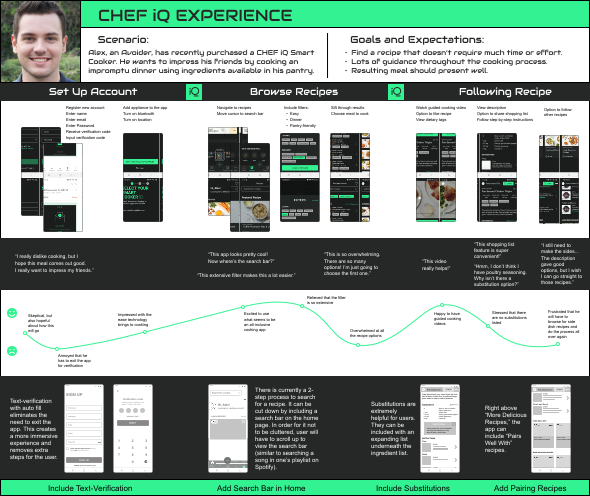
A user journey exploring how Alex, an “Avoider” persona, uses the CHEF iQ Smart Cooker app to cook an impromptu dinner and impress friends — and where the experience can improve.
Scenario
User: Alex, an Avoider, recently purchased a CHEF iQ Smart Cooker.
Goal: Impress friends by cooking an impromptu dinner using ingredients available in his pantry.
Goals and expectations:
- Find a recipe that does not require much time or effort.
- Lots of guidance throughout the cooking process.
- Resulting meal should present well.
User Journey
The journey covers account setup, browsing recipes, and following a recipe — with emotional highs and lows at each step, from excitement about the app to frustration over missing substitutions and side-dish discovery.
Recommended Improvements
- Include text verification — Auto-fill verification codes inside the app to avoid exiting during sign-up and create a more immersive experience.
- Add a search bar on the home page — Reduce the two-step recipe search process. Users scroll up to reveal search, similar to finding a song in a Spotify playlist.
- Include substitutions — Add an expandable substitutions list under ingredients (e.g., poultry seasoning alternatives).
- Add pairing recipes — Surface “Pairs Well With” recipes above “More Delicious Recipes” so users can complete a meal without restarting the browse flow.